Friday, September 15, 2017

Everything is logged at EVA Park

I have done many educational projects with OpenSimulator, but EVA Park is something completely different. On this island all people are really working!

EVA Park
EVA Park is a multi-user online virtual world, created in OpenSimulator, that gives people with aphasia unique opportunities to practise their speech and establish social connections. It was created at City University of London, via a process of co-design where people with aphasia collaborated with researchers in human-computer interaction and speech and language therapy.

Group session in EVA Park
EVA Park contains a variety of virtual locations including shops, restaurants, a hairdressers, houses, a bar and disco, together with fun and fantastical elements.  Users are represented by personalised avatars and communicate by talking through their headset to each other (yes they talk!). The initial study involving 20 people with aphasia showed that using EVA Park led to an improvement in functional communication. Now a new study started where groups of eight people with aphasia and four volunteers enter EVA Park all at once, to see how social interaction works with these people within this virtual world. The first session was great, so in the comming weeks EVA Park will be busy.

Logged data of user
Very useful for research is that all movements are logged in EVA Park. So as soon as the user logs in, a hidden detector will send information to a script on the website that will log this information onto a database. But also when a user walks or flies around, every 30 seconds the HUD (Head Up Display) sends information about the location to the database. Also the interaction with objects is logged, so if a user clicks on a board, sits on a chair or clicks one of the buttons of the HUD, this event is logged, including the location and time. Very useful information for the researchers. These logs can even be shown on a map of the island, thanks to HTML5 Canvas which give the option of drawing over a picture, on a webpage.

Map of the logged data
The HUD is attached automatically whenever a new user logs in. A great feature of OpenSimulator called 'osForceAttachToAvatar'. And if an avatar loses his HUD, it can always be reattached by simply clicking on a box at the service desk in EVA Park.

Unfortunately for outsiders, this island can not be visited, it is a closed environment where we want the people with aphasia to feel comfortable and free to do whatever they like.

If you want to know more about EVA Park and the research we do on it, please go to evapark.co.uk 


Wednesday, July 22, 2015

Media on a prim in OpenSim, how educators can use it

Working and educating in a virtual world can be a lot of fun, but sometimes you also want external tools to appear in this world. The best way for this is to use MOAP (Media on a prim)

Webkit
To use MOAP (Media on a prim) in OpenSim you need a viewer that can show this. The viewer needs to have a so called 'webkit' built in, to show a webpage or any other media on the side of a prim. This webkit is not always the same, like the Singularity viewer until recently had an older version that did not really work great with https formatted websites and gave some kind of SSH error.
Now it is up to date, like the Firestorm viewer for OpenSim, both are now capable of showing many sites so the webkits are updated to the latest version. I tried some educational websites, to see if it was possible to use educational webcontent on our 3DLES EDUgrid.
 First on my list was Voki, a website where you can create talking heads for free. This can be a very handy tool to have some item in your virtual world explained. So I created this character that welcomes new visitors in the virtual world and explains a bit what the visitor can do here. On the right you can see the working version and below a picture of the voki in the 3DLES virtual world. In order to get this working on the prim I only had to copy the given link of the Voki to the media settings of the prim side and change the settings of the horizontal and vertical scale and offset, so that it fits. And I did not want to show the control bar over this prim so I untagged this option.

Voki in the welcome area of the 3DLES EDUgrid
Learningapps.org
The learningapps website offers all kinds of quizzes that you can create for free. These 'apps' can also be placed on an object in the virtual world, and they can be controlled by clicking with the mouse. So a student can do any interactive quiz in-world.

Learningapps puzzle on a prim
Also embedding youtube video's is an option that can be done quite simple, the only thing that needs  to be changed is the URL of a video so it will be fullscreen (embedded). You can do this by copying the link of a video and replace /watch?v= in the URL to /embed/  so the url should look like this... https://www.youtube.com/embed/NKzcSoD-QCc Below you can see how this looks in the virtual world.

Youtube video on a prim
These three tools run fine on both the Singularity and Firestorm viewer. Any other tool, like Prezi, Quizlet and Infogr.am only ran on the Firestorm viewer, when Singularity was not updated yet. The update solved the problem. (updated June 1016) 

Wednesday, January 7, 2015

Windows tablet will save education in virtual worlds?


Last november I spoke at the the first National Congres on Education in Virtual Worlds in Tilburg (NL) about what the future might bring. And tablets was one of these hot future items.

Lots of schools are using (or planning to use) tablets, most of them use iPad at the moment. But on an iPad it is not really possible to work with virtual worlds like OpenSim and Second Life. The only solution I found for iPad is 'SL Go', which allows you to log on a server that connects to the virtual world, creates the graphics for you and sends the stream to your tablet, for only 10 $ per month (only available in the USA at the moment), but it does not run voice chat yet. 

Surface Pro 3
Microsoft Surface Pro 3
With the new Windows 8 tablets and '2 in 1' systems a whole new world opens for working in virtual worlds. Now we can have a full Windows tablet running our favorite software to enter OpenSim or Second Life. With even the audio and voice chat working. Starting at € 300 we see brands like: Asus, Acer, Dell, Medion, HP, Sony, Lenovo, Samsung and even Microsoft in the higher range with their Surface Pro series. These tablets offer full Windows so you can work with all your favorite software tha you used for all these years but now on a tablet, including the software to enter OpenSim and Second Life! 

Archos 80 Cesium running
Singularity viewer.
So I did a little test and bought myself a cheap Windows tablet (Archos 80 Cesium - 8" screen) at the local drugstore in our village for 125 Euros ($145), and installed the Singularity viewer on it. After logging in at the 3DLES grid I found everything working fine. It loaded all the graphics fast, navigation works well with the on-screen navigation arrows (a bit small on a 8" screen) and even voice chat works fine. Just wear a headphone and use the microphone in the tablet. So I tested it some more to see if I could also do some video conferencing using Big Blue Button, which also worked fine. The webcam at the front does the work. The only thing that is not really great is shortage of memory. 16 Gb is not really enough to have a great running tablet and the 8 inch is actually a bit too small, but it is a start. So anyone who wants to use a Windows tablet for OpenSim of Second Life, go for the 10 inch with at least 32 Gb memory.

This month we had the Dutch National Education Show in Utrecht (NOT) and I expected to see a lot of Windows tablets there running educational software. Unfortunately not so many as I hoped. So we should spread the word that a Windows tablet is the best choice for education. Want to see the videoreport of my trip, watch this...


Want to see some more about this item?
  • Short video of the National Congres Education in VW at Fontys Tilburg (NL), click here.
  • Video of Søndermarkskolen, Denmark that used Dell tablets for a 3D project on the 3DLES demogrid, click here.


Tuesday, September 30, 2014

Education in Virtual Worlds

Until now I have been working with language educators all around Europe in the TILA project and did some research at the University of Alcalá de Henares in Spain for the 'Spanish Language Route' project. Finally this Spanish project decided to use the Unity3D platform to create their course, mainly because this project did not need a virtual platform where people could meet and talk, they just wanted to create an interactive language game and sell it.
Presenting area on the TILA grid
But besides language education there is so much more to explore in educational virtual worlds, like walking in historic scenes, visit a Roman fort or ancient Egypt, see monasteries from the inside, explore buildings that are not open to the public or do not exist anymore.

For all the Dutch readers, there will be a FREE conference about 'Virtual Worlds in Education' at 13 november at the Fontys in Tilburg (NL).
More information about it can be found here.

Watch the new 3DLES video:

Monday, December 2, 2013

OpenSim in stereoscopic 3D

Last week we (3DLES) did a presentation on an educational fair in the Netherlands in stereoscopic 3D with a Epson 3D beamer and the CtrlAltStudio viewer for OpenSim. The Dutch company EPS-presentation invited us to present our educational OpenSimulator environment on this fantastic beamer. The result was amazingly good and it was also quite easy to work and build in this 3D mode. Some teachers were uncomfortable with the 3D view but the young students were all very excited.
Epson 3D beamer(s)
As you can see the beamer is actually two beamers in a frame. One beamer for the left and one for the right eye. See the specs of the beamer, and it has a very good pricing, around € 1600. The CtrlAltStudio viewer version 1.0 (ctrlaltstudio.com) on a Windows 7 computer connected it all to our 3DLES OpenSim environment.  Really a great experience.

Wednesday, June 12, 2013

3DLES partner in European TILA project

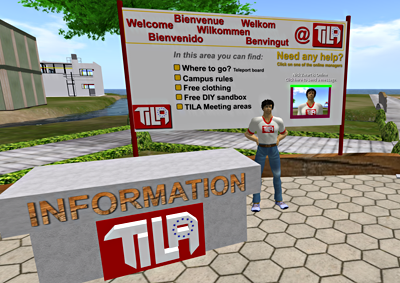
TILA welcome area in OpenSim
This year 3DLES teamed up as a technical and educational partner in the European TILA project. This project aims to improve the quality of foreign language teaching and learning processes by means of meaningful telecollaboration among peers: that is the aim of the European project Telecollaboration for Intercultural Language Acquisition (TILA). The project is funded by the European Commission within the Lifelong Learning Programme and will run from January 2013 to 2015.

What does 3DLES do? 
3DLES takes care of the technical department. Installing and running OpenSim on a dedicated server, the website and Moodle, Big Blue Button teleconferencing software, etc. But we also build and script new tools and regions in OpenSim and take care of educating teachers to work with these environments.

TILA project Objectives
The TILA project seeks:
  1. to innovate and enrich language teaching programmes at secondary schools and make them more motivating and effective by stimulating telecollaboration for intercultural awareness with peers of other cultures;
     
  2. to empower language teachers and teacher trainers and contribute to the development of their ICT literacy skills and organisational, pedagogical and intercultural competences for telecollaboration, by promoting experiential learning in telecollaboration tasks development, implementation and evaluation;
     
  3. to study the possible added value telecollaboration might have in language learning for intercultural understanding of younger learners.
More information about this project can be found at tilaproject.eu 

Wednesday, October 3, 2012

MetaMeets 2012

Last year I visited MetaMeets 2011 in Amsterdam and was impressed by all the OpenSim knowledge that was walking around in real life there. Great presentations and a real Amsterdam ambience.

This year MetaMeets 2012 was held in 's Hertogenbosch (the Dutch just say Den Bosch) on Friday November 30th and Saturday 1st December. The theme is: “The Art of Creation : Virtuality meets Reality” 

On Friday I spoke there about how we have used OpenSim so far to create and run virtual language villages for K12+ and how OpenSim is a great addition for educators world wide.
Other speakers on this 'Open Source Worlds' topic were: Maria Korolov of Hypergrid Business (www.hypergridbusiness.com), Justin Clark-Casey, a core developer of OpenSim (justincc.org) and Jan Northof of YOUin3D (www.youin3d.com).


Watch the  recorded livestream of Justin CC and Nick Zwart

Tuesday, August 21, 2012

Interactive Flash on one prim for v1 and v3 viewers.

Programming in OpenSim can be a struggle, but every once in a while I find some simple solution that really helps. 

We are 'between' times with still lots of educational institutes using a v1 viewer like Imprudence but others allready made the step to a v3 viewer. We have to find ways to show them both the content without having two separate objects showing the same.
In a previous post ( Flash and streaming video on a prim) I allready wrote about the use of Flash interactively on a prim in Imprudence 1.4.0 beta 2. Most schools use this viewer and it works great. having the URL of the parcel set to the flash file that I want them to interact with in-world.

Spanish pronunciation keyboard
But what about the new v3 viewers?
I recently created a keyboard with pronunciations of the Spanish alphabet which I wanted to use for the Imprudence viewer but also for the v3 viewer (Firestorm) that we use in a pilot at the university of Alcalá de Henares in Spain.
So by setting the parcel media to the URL of the flash file gave me the possibility to press the buttons of the Flash keyboard in-world and hear the pronunciation of the letters. The only problem was that in my Firestorm viewer the Flash file shows but I could not press any button.

How can I have both working?
Prim media settings
The solution was quite simple, the settings for Imprudence were fine, so I did not change anything there. So I used the Firestorm viewer to set the extra prim media settings of the prim face where the keyboard was set on, to the same URL.

It works!
So what happens? When I log in with my Imprudence viewer the extra settings of the prim media will not be seen, it will see the settings of the parcel media and show the page on the prim, and I can interact with it.
When I log in with my Firestorm the same happens, the webpage appears but is not interactive, but because of the settings I made for the prim media, after one easy click it will change from parcel url to the prim url, which is interactive again. The problem is solved.

Friday, July 6, 2012

OpenSim on Android (1)

Finally we are getting in the right direction, Opensim and Second Life on an Android phone or tablet.
You got to check that out on http://www.lumiyaviewer.com/
The Lumyia viewer version 2.3.1 now shows the avatars, great news.

Great news. The new Lumyia v 2.3.1 shows the avatar.
Chatterdale in OpenSim on my Samsung Galaxy Ace (v2.0)
Chatterdale - screenshot on a Motorola Defy (by Torrid Luna)
Chatterdale on a Samsung Galaxy Tab2 10.1 (v2.0)

Tuesday, January 31, 2012

OpenSim DIY or not?

Have you ever considered running your own OpenSim region? Well I did!
It runs, it works, but it was not easy. What were the steps I had to make? Let me tell you...

After years of building and scripting in SL and on the OpenSim grid at virtyou GmbH, I wanted to experience this installing and running an OpenSimulator server myself. I must say, it looked easy to do..... One of the members of the Dutch Edusim group (Johan Taal) wrote a great DIY on this at eduwiki.opensim.nl, which is in Dutch.
I used one of my old computers and deleted Windows, installed Ubuntu on it. That all went smoothly, even the fixed IP address was easy (I thought). Then I downloaded the latest OpenSim version, compiled it and set it up as a standalone version. It worked. But that is just the start, I wanted to have this sim working on Hypergrid, so more installing had to be done: mysql database system, Robust, ini files had to be worked on, etc.

Torrid Luna (virtyou) visited me via Hypergrid
Finally it worked. It spent many hours to have the basic OpenSim grid running, connected to Hypergrid. But none of the additional modules are working yet, no friends list, no groups, etc. But Vivox voice runs fine, after sending a short email they gave me a free account which was very easy to install. Thanks Vivox.

OpenSim DIY?
OpenSim DIY or not? Well we are still testing, not all steps have been made yet so it is too early to draw any conclusion now, but it looks promising.
Sure, I want a stable environment for my schools and it will take much more editing and time before it all works fine on my personal grid, but it is interesting to find out how things work and how OpenSim has to be set up. I still don't know how to backup this, I have no account creating portal, but that will come, patience is the word in this.
So if you like programming and fiddling with ini files and modules, you should really try this, it works. Having your own grid is the ultimate form of getting yourself started creatively.
Any Dutch users can ask for a free account at edugrid@opensim.nl to have a look around the Edugrid and see what a 3D world offers.

OpenSim rental?
You can also let someone else do all this backups, upgrades and problem solving, saving all the hours you spent on installing and tweeking. For only 40 euro's a month (educational pricing) any educator can have his own region running at virtyou. And it's fast, stable and allways there. Building and scripting Chatterdale - the first virtual language village on OpenSim - was fun to do and now that several schools in Europe are using it I can see that I made the right choice with this grid. Want to have a look on the virtyou grid? Go to http://virtyou.com/en/ and create an account there.

So?
Until now it has been a great experience to install OpenSim for myself (thanks to Edugrid), I am proud that I have a grid running in my own house. It will take some time to tweek all the littile errors out but I will get there. My Linux (Ubuntu) machine is running fast and I can build on my own land. That's Ok for now, but I do want more.

More?
The Virtyou grid can be found at: http://virtyou.com/en/
For all the Dutch users, you should check out http://eduwiki.opensim.nl/ and http://edugrid.opensim.nl/

Monday, November 7, 2011

Virtual language village wins European prize

At the seminar of 'Levende talen' (modern languages) ​​in Utrecht (NL) Digischool 3D won two prizes with their 'virtual language villages' project. One prize was awarded by the public and the other was an honorable mention from the jury of the European Language Label. The European Language Label is a European prize for innovative language projects. In the Netherlands, the European Platform, which promotes internationalizing education, organizes this contest, commissioned by the Ministry of Education.

Koos Boekensteijn and Nick Zwart
In total, the jury examined 30 entries, nine of which were selected. This selection was invited to the seminar to show the projects to the jury and the public.

Koos Boekensteijn (English Community manager) and Nick Zwart (3DLES, creator of the language villages) received the two prizes.

The virtual language villages are built by 3DLES at the OpenSim grid of virtyou and are open to the public.
Want to visit the grid? More information can be found at: 3dles.com/en/tryout.html

3DLES and virtyou created a special EDU area at the virtyou grid where several educational projects can be found. Among them you can find: two language villages of Digischool, three Niflar language regions, Devil Island Mystery of Chris Surridge, Sloodle 1.0 testing regions, the University of Tilburg with a Hebrew region, etc.

Friday, October 28, 2011

Virtual Worlds, an educational experience, or boring?

Educating in virtual worlds is not only creating some virtual buildings where students and teachers can virtually walk around. It needs interaction and immersive experiences, every object needs to teach something, the area needs to be one big learning experience.

Using virtual worlds for education is quite new in this little country I live in (Netherlands). There have been some projects in the past year that really look good, but that is not enough. Walking around in a beautiful virtual environment can give the student the feeling that he or she entered another new world, but what is there to learn, what experience does this environment offer?


First encounter

Chatterdale - virtual language village of Digischool.nl
Learning in a virtual world is new to most students and teachers in secondary school. So when they enter this new experience it is overwhelming, they have to get comfortable with the 3D environment. Suddenly they have a new identity they can alter, change clothes, hair, skin and shape, even change gender can be changed within a second. They can choose to become anyone they like and use this new identity to experiment, to behave different than normal. They can also choose to create a copy of the person they are in real life or become an fantasy figure, everything is possible. All these different personas can be stored in the personal inventory of the avatar and can be used instantly. 
Suddenly students are in a world with new things to see and do, where they can even fly. How long will this overwhelming experience last? What time do they need to come up-to-speed in this 3D platform before they can start learning in 3D?

Boring?
Boulangerie - Patisserie (baker) at the
French virtual language village Parolay.
After a few hours working on their new self creating a suitable look, students will start to explore, walk and fly around to see what else can be done in this virtual world. They will start looking for interactivity with all sorts of items in the environment, so it needs to be there, easy to find. Without this possibility to explore, it soon will be boring. So some sort of treasure hunt or tour around the estate would be the next move to keep the students active and interested. This is where education starts, by showing them what can be done in this specific 3D Learning Environment. Just some nice buildings is not enough!


Wednesday, July 6, 2011

Hollidays, OpenSim and SL on your cell phone!

Hollidays have arrived and we all want to stay in touch with our virtual friends in OpenSim or Second Life, but how? My cell phone!

Now that I spent (too) much time sitting outside in the sun and not behind my computer in my office it is good to check some apps that can connect me to my favorite grid to keep in touch with my friends overthere. For both Android and iPhone/iPad I found apps that do the trick.

No 3D view, no voicechat!
First I want to mention the things these apps do not have... 3D view and voicechat. Lets have a look what both the Android and iPhone apps do have...

Android
Mobile Grid Client (Android)
For Android phones I found one app called the Mobile Grid Client.  It is an OpenSim and Second Life messaging client for Android powered cell phones. What does it do?
  • Local chat and instant messages – converse with your friends, groups or someone else.
  • Teleport to other regions and nearby avatars.
  • Region map with accurate positions of other avatars.
  • Profiles – look at your own and others profiles.
  • Full inventory manipulation – rename, move and delete items and folders.
  • Designed with usability in mind – simple and intuitive to use, tap chat and instant messages to get more information about the sender.
  • The unique always on feature – stay logged in while answering a phone call or carrying the phone in your pocket.
  • And many more... for a complete list of features look at www.mobilegridclient.com/licensing
But it is not free, there is a trial periode of 14 days and after that you have to pay 250 Linden$/month (one real Dollar) for the standard version or 450 Linden$/month (or 4500 L$/year) for the Pro version.

After downloading and installing it I just had to pick out my favorite grid in the list, in my case the virtyou maingrid and log in. On the map I could directly see where I am and if there are any other avatars around. Most usefull is the chatpage, where I can see which avatars are around me including the distance in meters and I must say, sending the chat message into the virtual world goes very fast.

Teleporting to other locations is also working fine, just find the right landmark in your inventory and teleport there. So if you have all your favorite locations as a landmark it is easy. On OpenSim there are still some problems like when someone offers me a TP, I cannot make the jump yet. And walking is not an option in this app. More information you can find at: www.mobilegridclient.com Take a look at the video on the 'How to use it' page.

iPhone and iPad
Pocket Metaverse (iPhone/iPod/iPad)
Here we have the Pocket Metaverse which has a free and a paid version (4.99$). The free version has the following features:
  • IM
  • Chat
  • Payments
  • Profiles
  • Maps
  • and Teleporting.
You can upgrade from within the app to unlock the following Pro features:
  • Groups, Search
  • Giving, Receiving, and Managing Inventory
  • Read Notecards and view Snapshots and Textures
  • Upload and Download from the Photo Album and Camera (iPhone only)
  • Ability to connect to any OpenSim grid
  • Turn off advertising
  • and much more...
I use this one allready for a year now on my iPod touch and iPad (big screen, looks good), and it does the same tricks as the Mobile Grid Client for Android. One small advantage is that walking is possible with the Pocket Metaverse app.
More information can be found at  www.pocketmetaverse.com

Both worth trying out this summer. Enjoy!

Saturday, June 25, 2011

Soundscaping tips for OpenSim and SL

After visiting many regions on SL and different OpenSim grids, one thing really caught my attention: the lack of sounds. I found myself walking in 'The Great Silence'.
So many regions look really fabulous with great buildings and fantastic landscapes but where are the sounds? Where are the birds, wind, mumbling people, a churchbell far away, sounds I normally hear when I am outside? It all looks real but it still does not sound real. Time to get started with some soundscaping.

How can I have environmental sounds playing?
The easiest way to play a sound on a particular spot on your land is creating a single prim object which contains a soundfile and a script.  Current OpenSim sound format that can be used is PCM WAVE (.wav) 16-bit/44.1KHz/mono or stereo with a maximum length of 10.00 seconds. Some sound can be found as freebies on some grids, but if you want a special sound you have to make it yourself and upload it via your viewer.
After uploading you can create a single prim and place the soundfile (search for it in the inventory) in it. You also have to create a script in the prim that will play the soundfile in a loop. A script that works fine looks something like this:

default
{
    state_entry()
    {
        string sound = llGetInventoryName( INVENTORY_SOUND, 0);
        llLoopSound( sound , 1);
    }
    changed(integer change) 
    {
        if (change & CHANGED_INVENTORY) 
        {
            llResetScript();
        }
    }
}

If you place the object (filled with the sound and the script) somewhere on you region, you will hear it somewhere in the stereo spectrum of your speakers with a certain volume. When you walk away from it the volume of that sound will be less. When you walk towards it the volume increases. When you turn your avatar around, you will notice that the sound will change speakers.
So every part of your sim or land can have several environmental sounds playing. Which will make it a lot more realistic.You can place as many as you like and test it for yourself. You can even place the sounds and script in object that allready exist on you land. A church can have a churchbell ringing every now and then. A tree can have birds singing in it. And how about waves at the beach?

Can't I play environmental sounds via Parcel Audio?
Play button
Yes, it is also possible to play a sound (or music) via the Parcel Audio settings. This sound will be heard all over the parcel in stereo. So wherever you walk within the parcel, the sound will be heard on the same level and location. But it will only be played when you hit the PLAY button on the bottom of your screen and it only plays once, there is no loop. So if you want to use this option you have to make a very long file. One advantage is that it can be a mp3 file, so it won't be that big. Once you created the file, put it on a webserver and copy the URL of the file into the 'About Land - Audio' Music URL.
You can even play a sound using the Media settings, even with a loop, but it is better to use this option to show video and webcontent. Which can be interactive with the latest Imprudence 1.4.0 viewer. More info about interactivity and Web On A Prim can be found in one of my blogs called: Flash and streaming video on a prim

Where can I get sounds?
There are some wonderfull sites that have free sounds, I have listed them below. The only problem is that you have to edit most of the sounds to create a soundclip that is a .wav file and not longer than 10 seconds, most viewers can not upload longer files.
(UPDATE AUG 2016 - The latest Firestorm viewer 4.7.9 now can handle audio files of maximum 60 seconds.)
It is best to use a mono sound when you place it in a prim.
When you use sounds playing through the media channel of the land settings it is better to have it stereo.
Free sounds can be found at:

How can I edit the sound?

You can edit the sounds with any audio editor you have on your computer. Maybe you recieved one with your video editing or you cd burning software. If you haven't got any editor I can suggest a good audio editing program for this purpose, the Audacity editor (freeware) which can be found at: audacity.sourceforge.net/

Any more scripts can I use?
If you want to create a script playing sounds 'the way you want it to happen' you can also use the 'Script Me!' pages. You can find them here: www.3greeneggs.com/autoscript
Any other scripts you can find at:

Have fun, and if you have any questions or suggestions? Post a comment!

Monday, June 20, 2011

Scratch4Opensim - Scripting in OpenSim made easy

Scratch4Opensim
Scratch4Opensim is a great tool for creating easy scripts in OpenSim. It has been around for a few years now but everyone I talked to so far (in Holland) had never heard of Scratch. For simple tasks Scratch is perfect, it is fast and easy. And educators (like me) can use Scratch as a perfect tool to learn children and teens how to script.

To get an idea of what Scratch4Opensim can do there is this nice tutorial on Youtube to watch. In 9 minutes Avasari Buninyong shows the possibilities of Scratch4Opensim on a simple way.

New edition?Now you might think this is old news, but this summer (2011) some clever guys will work on a new version called Scratch3D. I think this will be an online version, made in Flash, where the old Scatch4Opensim version will be integrated. More info about this can be found at http://roots.greenbush.us/3/wordpress/?p=1368 

Any more scripting sites?
Try it for yourself and have fun this summer. Looking forward to see the new Scratch3D made in Flash!


Wednesday, May 18, 2011

Flash and streaming video on a prim in OpenSim

The new Imprudence viewer 1.4.0 beta 1 has this great new feature called Web On A Prim, not new for Second Life users but in OpenSim it gives a lot of new possibilities. The most awesome thing I found is that it also shows pages with Flash (one thing I really miss on my iPad).

So what's the big deal?
Well, all things I have ever made in Flash, I work with Flash since version 4 (1999), can be used in-world. All games and interactive gadgets I made for education can be played inside the virtual worlds that I work on. Flash runs like it should, all controls work. The big advantage is that all gadgets I could not program in OpenSim can now be made in Flash and projected on a prim.

What's the limitation?
In front of the YouTube page
Ah, yes, there is one small limitation. The webpage to be shown has to be set in the PARCEL MEDIA (mostly by the owner of the parcel) so every parcel can show just one webpage, and that page is only shown to the user when his or her avatar is in that particular parcel. Crossing the border to another parcel stops showing the page on that prim. But many parcels can be made on a region. Last year I built a virtual language village where every building and shop is placed on a separate parcel, so the land is divided into more than 20 parcels. So the limitation is not that big.
One other limitation is that webpages on a prim are shown individual, so if I select a link on a page, other users will not see that.

How about streaming video like YouTube and Ustream?
Well that works too. If you place the YouTube url in the parcel media you can browse and play movies like on a normal browser. The only thing that does not work is the full screen button so if you want to show a particular YouTube video full size on a prim it is best to create a webpage with an embedded YouTube player.

Streaming webcam
Another great thing you can do is using Ustream (www.ustream.tv) for free streaming real-time video from your webcam onto the prim. Ustream uses the Flash player to connect your webcam to the web. And it gets even better with the free Ustream Producer (www.ustream.tv/producer) which gives many options like mixing your webcam with screen captures and importing video and audio.

Anything else we should know?
Preferences settings
Yes, in the preferences there is one extra setting to be made at the Audio & video tab. It is good to use the Media helper widget, this zooms in at the prim and shows some control features below the prim whenever you click on it.

So this is in the new Imprudence?
Yes, Imprudence 1.4.0 has left the experimental fase most of the bugs are gone and the final 1.4.0 beta 1 is released. You can find the Imprudence viewer at: http://blog.kokuaviewer.org/

Wednesday, February 16, 2011

Claus Nehmzow about 3D Avatar School

Claus Nehmzow in Hong Kong, is one of the first to use innovative media techniques for bussiness, using virtual worlds and social media. This TEDx presentation tells us in 16 minutes how education can be fun using virtual worlds. You have to see this, enjoy!


Monday, December 27, 2010

2011, vooruit kijken op 3D onderwijs.

Aan het eind van 2010 is het misschien goed om in de glazen bol te kijken en te voorzien wat er ons allemaal te wachten staat in het komend jaar, welke richting we daarmee op zullen gaan.

Als eerste stap ik eerst over op een andere provider. KPN heeft me flink laten zitten in het afgelopen jaar. Na een onweersstorm in de zomer begaf mijn oude modem het en kreeg ik van KPN een Experia Box. Als snel bleek dat het modem een eigen leven ging leiden wanneer ik er maar even iets meer mee deed dan gewoon surfen en mailen. De spontane resets zijn nu een dagelijks zaak geworden. Net als ik een flinke upload naar een server doe of met een avatar op een OpenSim omgeving inlog, reset de Experia Box zichzelf. KPN heeft na mijn klacht gelijk een nieuwe opgestuurd maar ook dat gaf hetzelfde probleem. er blijft niets anders over dan overstappen dus!

Whisper for Opensim
In augustus werd met tromgeroffel het nieuwe voice systeem voor OpenSim bekend gemaakt. Er werden tests mee gedaan en het klonk allemaal veelbelovend en ook nog van hoge kwaliteit. Al snel zou de uitgewerkte versie beschikbaar worden gemaakt maar daar is het helaas nooit van gekomen. Na wat heen en weer gemail gaf het laatste bericht van eind oktober de melding dat ander projecten voorrang kregen en de broncode beschikbaar zou komen op een server. Ook dat is helaas niet gebeurd. De enige conclusie die ik hieruit kan trekken is dat we dit project kunnen afschrijven. No whispering in 2011.

Kokua Project
De tweede helft van het afgelopen jaar kwam het bericht dat er een nieuwe viewer en OpenSim software zou komen die perfect op elkaar zouden zijn ingesteld. Hoera, eindelijk. Na alle vastlopers en errors is het tijd voor een versie zonder ellende. Maar techneuten achter dit geheel hebben een time-out genomen en pas in januari 2011 zal er weer aan gewerkt worden. Of dit systeem ook daadwerkelijk zo stabiel is als ze beweren is nog maar de vraag. Laten we het hopen. We blijven het volgen op blog.kokuaviewer.org

Unity3D
Een rare nieuwkomer is Unity3D. Een game engine die sinds afgelopen jaar gratis te gebruiken is en waar fraaie 3D applicaties mee gemaakt kunnen worden. Het systeem heeft een aantal voordelen die best wel interessant klinken. 3D objecten kunnen eenvoudig worden geïmporteerd vanuit Blender, 3ds Max en de vele andere design pakketten. De Unity Player is web-based en wordt eenmalig als plugin geladen, dat werkt net als het downloaden van een Flash player. Met behulp van een extra multiplayer server kunnen er ook meerdere gebruikers tegelijk online gaan en Unity3D is ook voor iPhone, iPad en Android te gebruiken dus protbale onderwijs komt hier wel heel dichtbij. Wat toegankelijkheid betreft wint Unity het van OpenSim en het is ook nog eens stabiel. Helaas is Unity niet compatible met OpenSim. In de gaten houden! http://unity3d.com/

Trainingen in Chatterdale
Vanaf januari worden er trainingen gegeven aan docenten Engels om met hun leeringen in Chatterdale te kunnen werken. Een belangrijke stap voor Digischool 3D. We gaan nu eindelijk van start met het dorp en ook het tweede dorp 'Parolay' groeit al flink. Ik ben benieuwd of er ook andere vakken van de 3D omgeving gebruik gaan maken. We zullen zien. Meer info: http://www.chatterdale.nl/

Thursday, December 9, 2010

Sloodle compatible met OpenSim? Ja, het werkt!

Het zal niet voor iedereen super nieuws zijn maar na wekenlang geploeter met scripts en objecten is het dan eindelijk zo ver dat de Sloodle objecten in OpenSim werken, tenminste op de sim waar ik zelf altijd werk. Bijna alle basisobjecten van de Sloodle set 1.0 werken goed. Reden voor een klein intern feestje met mezelf, want al die weken dat ik OAR's en losse objecten van de ene naar de andere virtuele wereld exporteerde waren af en toe wel een nachtmerrie zonder eind.

Het bleek al snel dat tijdens het importeren van een OAR de naam van de 'creator' van de objecten vaak ergens bleef hangen en het verder geen nut meer had om met deze objecten aan de slag te gaan. Dus dan nog maar eens proberen om de OAR ergens anders te importeren. Er waren andere Sloodle gebruikers die wel een eigen OAR met me wilde delen maar ook die hadden problemen om de objecten goed te krijgen. uiteindelijk ben ik op echt handwerk over gegaan. Objecten nagebouwd, of leeggemaakt en dan ge-exporteerd, en dan alle scripts er weer in over gezet. En dan maar hopen dat het de juiste scripts zijn.

Sloodle distributor

Maar nu zijn ze er dan toch, de Sloodle objecten zijn op de Digischool sim te vinden en iedereen kan er gebruik van maken. Even via een Hypergrid naar secondlife://virtyou.com:11002:Digischool 1/48/245/23 springen, op de Sloodle distributor klikken en het is voor elkaar.

Er verschijnt dan een map in de inventory die 'my suitcase' heet, en daarin worden alle objecten opgeslagen die je via Hypergrid binnen haalt. In de Suitcase zit dan weer een map genaamd: Sloodle4OpenSim - 12.2010 waar alle objecten in zitten. Het werkt!

Uitleg over alle objecten en handleidingen over hoe alles te installeren is, zijn terug te vinden op http://www.sloodle.nl/ of http://www.opensimhosting.nl/

Nu nog bedenken hoe we het in het lesmateriaal inpassen, dat is een volgende stap. Wie?

Monday, November 8, 2010

Bouwen met prims of meshes in OpenSim?

Er wordt de laatste tijd geregeld in blogs gemeld dat het importeren van meshes in OpenSim binnenkort mogelijk zal zijn. De eerste test waren positief dus lang zal het niet duren. Maar is het wel nodig?

Tot nu toe konden bouwers in Second Life en OpenSim gebruik maken van eenvoudige vormen zoals blokken, pyramides, bollen, buizen, etc. en dat is te weinig volgens de meeste bouwers, er moeten ook meshes kunnen worden geïmporteerd.

Het voordeel met meshes is dat een object er gelijk veel beter uit ziet omdat het uit een groot aantal kleine vlakken bestaat die met elkaar zijn verbonden. Op de afgebeelde dolfijn zijn deze driehoekige meshes duidelijk te zien. Een nadeel is we dat de mesh in een ander programma gebouwd moet worden zoals Blender, 3DS Max, Wings 3D of Google Sketchup (er zijn er uiteraard nog veel meer). Deze programma's zijn voor een doorgewinterde OpenSim bouwer, die alleen maar prims gewend is, wel even wennen.

Maar er zijn nog veel vragen... Kan elke viewer de geïmporteerde mesh straks weergeven? Hoe snel laadt een mesh met zoveel vlakken ten opzichte van een prim? Hoe makkelijk is het om een texture op een mesh te plaatsen?

Voor het bouwen van gebouwen en omgevingen, waar het toch veel op rechte lijnen aankomt, bieden meshes geen voordeel. Dat kan nog steeds het best met prims gedaan worden. En verder moeten we gewoon maar afwachten wanneer het echt goed gaat werken en ons vast verdiepen in 3D programmatuur. Ondertussen gewoon doorbouwen met prims!

Virtueel taaldorp Frans 'Parolay'